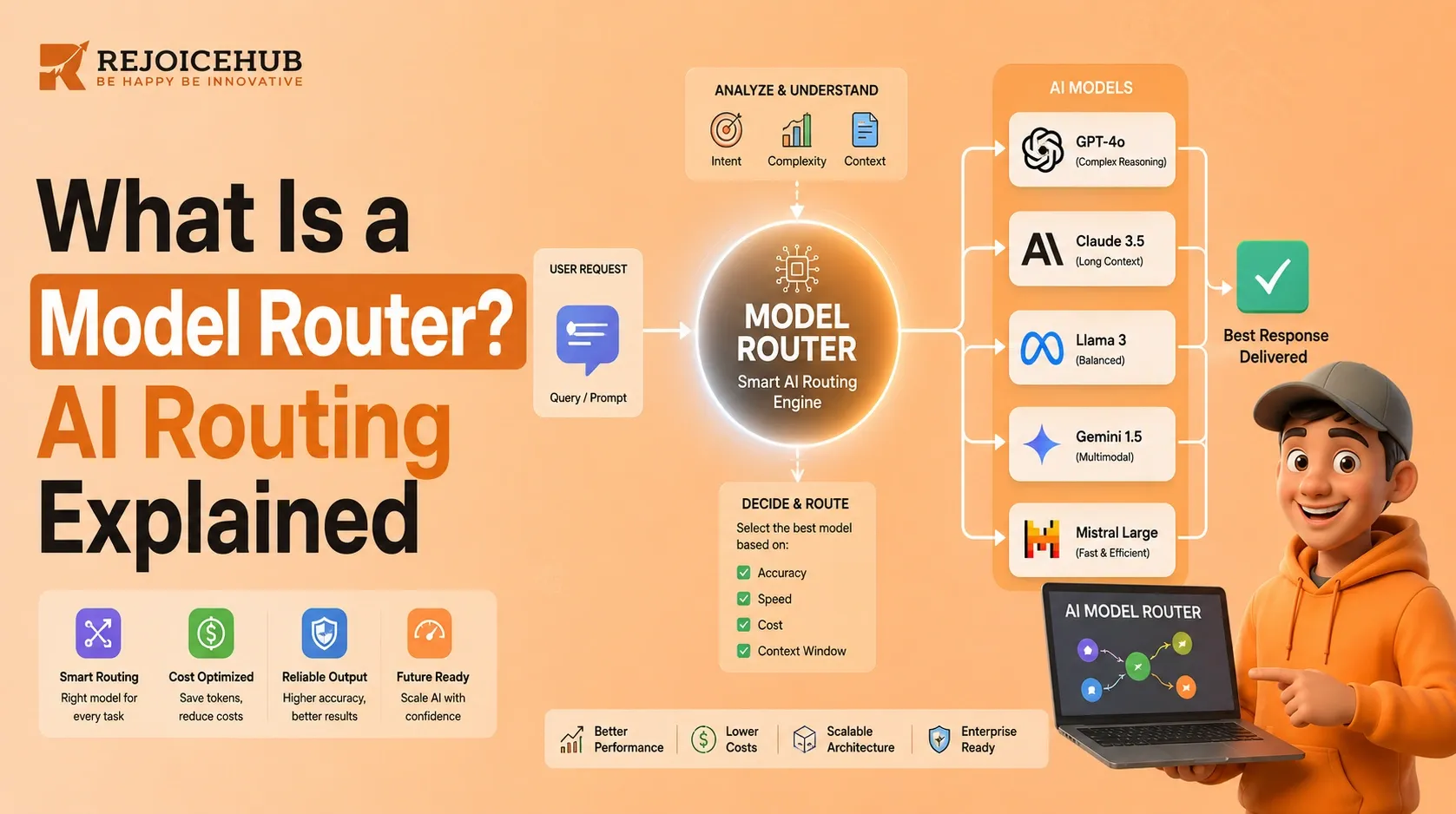
 If your product calls more than one large language model, you've probably already asked yourself what is model router and whether you need one. The short answer: almost certainly yes.
AI applications increasingly rely on multiple models instead of just one. A simple FAQ bot doesn't need the same horsepower as a financial-analysis agent, and paying premium-model prices for every request quietly drains margin. Model routing solves this by automatically deciding which model should handle each incoming request, matching task difficulty to model capability in real time.
This guide breaks down what a model router is, how AI model routing works step by step, why it reduces costs, its core benefits and limitations, and how it applies specifically to AI agents and enterprise systems.
Key Takeaways
-
A model router is the system component that selects which LLM handles a given request; model routing is the process it performs.
-
Routing typically evaluates complexity, task type, latency needs, and cost before selecting a model.
-
Businesses that route intelligently often cut inference spend significantly by sending only complex requests to premium models.
-
Model routing is foundational to reliable, scalable AI agents and multi-model enterprise stacks.
-
Cheaper isn't always better routing accuracy and fallback design matter more than raw cost-cutting.
What Is a Model Router?
A model router is the system or component that automatically decides which AI model should process a given request, based on factors like complexity, cost, latency, and required capability. It sits between the user (or application) and the pool of available models, acting as an intelligent dispatcher rather than a single fixed connection to one LLM.
Model Router vs. Model Routing
These two terms get used interchangeably, but they describe different things:
| Term | What It Means |
|---|---|
| Model router | The system or component that makes the selection decision |
| Model routing | The process of analyzing a request and directing it to the right model |
Think of the router as the traffic controller and routing as the act of directing traffic. Microsoft's current model-router documentation describes this similarly real-time selection of an underlying LLM based on the characteristics of the incoming prompt.
Simple Example of Model Routing
A basic routing flow looks like this:
User request → Router → Analyze complexity → Select model → Generate response
Here's how that plays out across common request types:
| Request Type | Likely Model Tier |
|---|---|
| Simple FAQ | Small/fast model |
| Summarization | Efficient mid-tier model |
| Complex reasoning | Advanced reasoning model |
| Agent tool execution | Specialized/capable model |
If your team is comparing this concept against related infrastructure, our breakdown of AI routing and gateway architecture is a useful next read.
Accelerate Your Workflows with Custom AI
Book a free consultation session with RejoiceHub. We'll map out a tailored automation roadmap for your company.
How Does AI Model Routing Work?
AI model routing works by receiving a request, analyzing its characteristics, selecting the most suitable model from an available pool, executing the request, and falling back to another model if needed. The entire sequence usually happens in milliseconds, invisible to the end user.
Here's the step-by-step breakdown.
1. Receive the AI Request
The router receives the user's prompt, an agent's tool-calling instruction, or an internal application query. This is the entry point nothing has been analyzed yet.
2. Analyze the Request
The routing layer evaluates several signals before making a decision:
-
Complexity of the task
-
Task type (summarization, coding, reasoning, extraction)
-
Reasoning requirements
-
Context length
-
Latency requirements
-
Cost constraints
-
Which models are actually capable of the task
3. Select the Best Model
Based on that analysis, the router picks the model that satisfies the application's requirements not necessarily the most powerful one, but the most appropriate one.
4. Execute and Return the Response
The selected model processes the request and returns output back through the router to the application or end user.
5. Fallback or Escalation
If the selected model fails, times out, or produces an insufficient response, the routing system can automatically escalate the request to a stronger model or reroute to a healthy endpoint. Microsoft Foundry's current implementation, for example, supports automatic failover when a routed model experiences endpoint instability a pattern most enterprise routing systems now replicate in some form.
Common mistake: Teams often build steps 1–4 and skip step 5. Without fallback logic, a single model outage becomes a full application outage. If you're architecting this layer yourself, our guide on LLM routing to cut AI costs covers fallback design in more depth.
Why Does Model Routing Reduce AI Costs?
Model routing reduces AI costs by sending only genuinely complex requests to expensive, high-capability models, while routine requests go to cheaper, faster models avoiding the waste of using a premium model for every single query.
Sending every request to a premium model is inefficient because most real-world traffic isn't uniformly difficult. A support chatbot, for instance, handles far more "what are your hours" questions than genuinely novel reasoning problems.
Without routing: 100 requests → all sent to a premium model
With routing:
-
60 simple requests → low-cost model
-
30 moderate requests → mid-tier model
-
10 complex requests → premium model
The point isn't to promise a fixed savings percentage actual savings depend on your workload mix, model pricing, routing accuracy, and how often requests get escalated. But the pattern holds directionally across most production systems.
This is increasingly relevant as enterprises scrutinize AI inference and token spend more closely. EY has reported using internal AI routing to reduce token consumption, reflecting a broader industry shift toward treating model selection as a cost-management discipline, not just an engineering detail.
If token spend is a recurring conversation on your team, it's worth pairing this article with our guide on AI agent token budgets and cost optimization.
Key Benefits of AI Model Routing
AI model routing delivers lower inference costs, faster response times, better quality-to-cost ratios, higher system reliability, and stronger AI agent performance by matching each request to the model best suited for it instead of defaulting to a one-size-fits-all approach.
-
Lower AI Inference Costs
Route simple, high-volume tasks to less expensive models and reserve premium models for the work that actually needs them.
-
Better Latency
Simple queries reach faster, lighter models instead of queuing behind larger reasoning models that take longer to respond.
-
Better Quality-to-Cost Ratio
Advanced models get used only when their capabilities are genuinely necessary, keeping quality high without inflating spend across the board.
-
Higher Reliability
Routing can incorporate fallback models and multi-provider redundancy, so a single model or provider outage doesn't take down the whole system.
-
Better AI Agent Performance
Agents can dynamically select different models for different stages of a task research, reasoning, tool execution rather than being locked into one model for everything.
It's worth being careful here: don't make unsupported blanket claims like "model routing always improves quality." The real objective is optimizing the tradeoff between quality, cost, and latency not maximizing any single one in isolation.
Model Routing for AI Agents and Enterprises
For AI agents, routing means different stages of a task can use different models based on what that stage requires; for enterprises, routing must also account for governance, security, and observability not just cost. This is where routing shifts from a nice-to-have optimization to core infrastructure.
1. Model Routing for AI Agents
Agents rarely need one model for an entire workflow. A typical flow looks like:
User request → Agent → Router → Appropriate model → Tool/action → Result
In practice, this might look like:
-
Customer support agent → efficient, fast model for routine replies
-
Research agent → stronger reasoning model for synthesis
-
Coding agent → coding-focused model for generation and debugging
-
Financial analysis agent → high-quality reasoning model for accuracy
-
Complex, multi-step workflow → premium model at the critical decision point
This pattern is gaining traction in research specifically focused on agentic tool-calling routing, underscoring how relevant model selection has become for agent architectures not just chat applications. If you're building agent workflows, our overview of AI agent orchestration is a natural companion piece, and our AI agent costs and ROI breakdown helps translate routing decisions into budget terms.
2. Model Routing for Enterprises
Enterprise routing requirements go well beyond picking the cheapest capable model. They typically include:
-
Cost controls and budget guardrails
-
Model governance and approved model lists
-
Security and data-handling policies
-
Latency requirements by use case
-
Observability and routing decision logs
-
Fallback mechanisms across providers
-
Scalability across teams and products
This is where working with an experienced partner matters. RejoiceHub's AI integration and AI agent development services are built around exactly these requirements, helping teams design routing layers that don't just cut costs, but hold up under real enterprise scrutiny. For a deeper look at gateway-level infrastructure that often sits alongside routing, see what is an AI gateway and what is MCP gateway.
Model Routing Approaches, Limitations & Best Practices
There are several common approaches to model routing rule-based, cost-aware, complexity-based, semantic, dynamic/AI-based, and hybrid, each with tradeoffs in accuracy, speed, and maintenance overhead. No single approach is universally correct; most production systems end up using a hybrid.
1. Common Model Routing Approaches
-
Rule-based routing fixed if/then logic based on request attributes
-
Cost-aware routing prioritizes staying within a budget ceiling
-
Complexity-based routing scores request difficulty before selecting a model
-
Semantic routing uses embeddings to match request meaning to model strengths
-
Dynamic/AI-based routing uses a model itself to decide which model to use next
-
Hybrid routing combines two or more of the above for better accuracy
2. Challenges of Model Routing
Routing isn't free of tradeoffs. Common challenges include:
-
Routing mistakes that send complex tasks to under-powered models
-
Quality degradation when routing is too aggressive on cost
-
Added latency from the routing decision itself
-
Model availability and provider outages
-
Context-window differences between models in the pool
-
Monitoring complexity as the number of models grows
-
The routing system itself carrying its own operational cost
3. Best Practices
-
Benchmark models against your real workloads, not generic benchmarks
-
Define clear quality thresholds before routing goes live
-
Monitor cost and latency continuously, not just at launch
-
Log every routing decision for auditability
-
Always build in fallback models
-
Continuously evaluate routing accuracy over time
-
Don't route purely on price cheaper doesn't automatically mean better
Teams evaluating which frontier models to include in a routing pool often start with head-to-head comparisons. Our Claude vs. GPT enterprise AI comparison and Anthropic vs. OpenAI enterprise breakdown are useful starting points for building your model pool.
Conclusion
At its core, model routing means matching the right model to the right task at the right cost. As applications increasingly rely on multiple LLMs for chat, summarization, reasoning, and agentic workflows intelligently selecting which model handles which request is becoming a foundational part of AI infrastructure, not an optional optimization.
If your business is building AI agents or integrating multiple AI models into existing workflows, intelligent routing can help balance performance, reliability, and infrastructure costs without sacrificing quality.
Want to build a production-ready AI system with intelligent model selection? Explore RejoiceHub's AI integration and AI agent development services, or book a call directly to talk through your architecture.
Frequently Asked Questions
1. What is a model router in simple terms?
A model router is a system that automatically picks which AI model handles a given request. Instead of sending every query to one fixed model, it analyzes each request's complexity, cost sensitivity, and latency needs, then directs it to the model best suited for that specific task.
2. What is model routing in AI, and how is it different from a router?
Model routing is the process of analyzing and directing requests, while the model router is the component performing that process. Routing is the action; the router is the system carrying it out. Both work together as one routing layer.
3. How does AI model routing actually reduce costs?
It reduces costs by reserving expensive, high-capability models for genuinely complex tasks while sending routine requests to cheaper, faster models. Since most real-world traffic isn't uniformly difficult, this avoids paying premium prices for simple queries that don't need them.
4. Is model routing only useful for large enterprises?
No. Startups and SMBs benefit too, especially once they're running multiple AI features or agents. Routing helps control costs early, before inefficient model usage becomes an expensive habit to unwind later at scale.
5. What's the biggest risk of implementing model routing poorly?
Quality degradation. If routing is tuned too aggressively toward cost savings, complex requests can get sent to under-powered models, producing weaker outputs. Strong routing systems balance cost against clearly defined quality thresholds, not price alone.
6. Does model routing work for AI agents, not just chatbots?
Yes arguably it matters more for agents. A single agent workflow might need a fast model for simple steps and a stronger reasoning model for critical decisions, all within one task. Routing lets each stage use the appropriate model dynamically.
7. What should businesses look for in a model routing partner?
Look for experience with fallback design, routing observability, and enterprise governance requirements, not just cost optimization. RejoiceHub's AI agent development services focus on building routing systems that hold up in production, not just in a demo.