
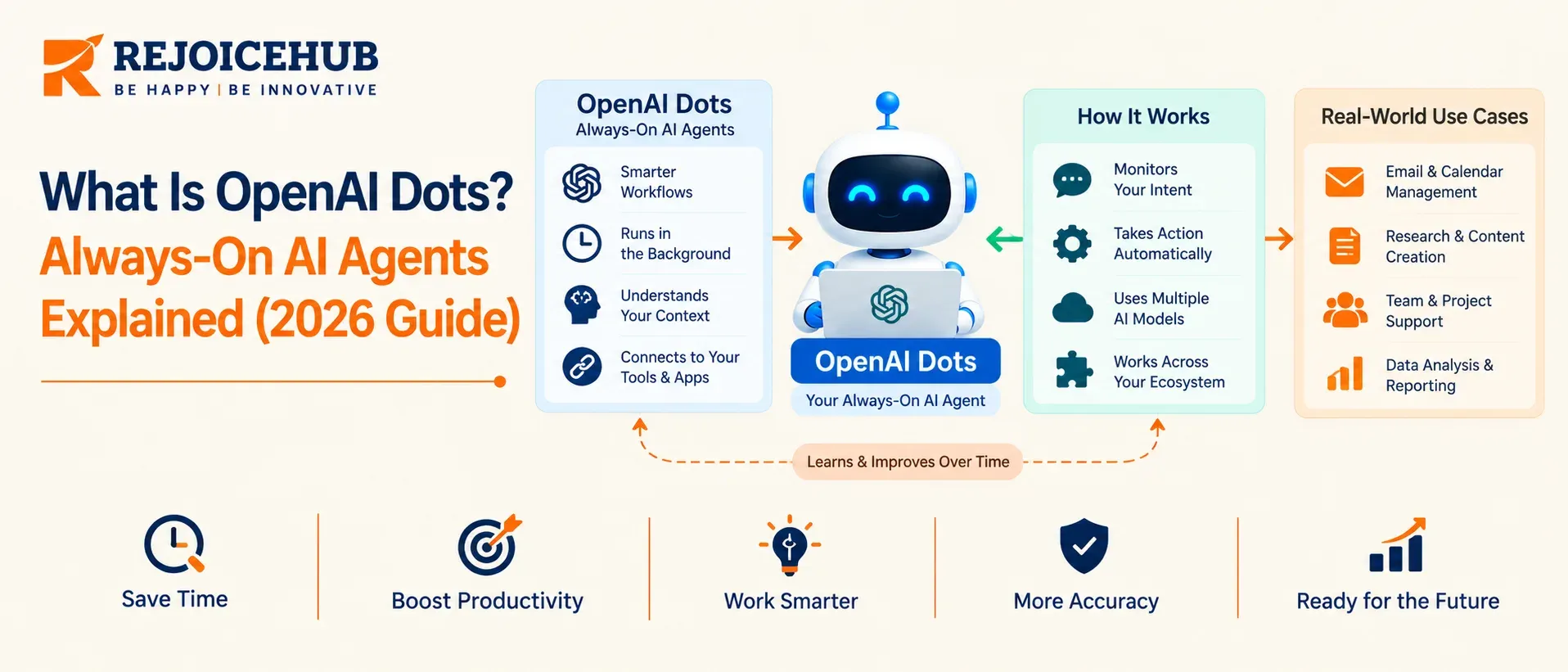
Most AI agents stop working the moment you close the tab. OpenAI's new Dots are built to do the opposite: they are always-on agents that keep working on your behalf. For anyone running automation inside a company, that raises two questions: what can a dot safely own, and when do you still need a custom-built agent?
Quick Summary
OpenAI launched Dots on September 29, 2026, at DevDay. Each dot runs on GPT-6 Astra with its own cloud computer and browser, connects to over 4,000 apps through plugins, and can work toward your goals around the clock. The first dot is included with ChatGPT Pro and Business Premium. Everything else (extra dots, add-on speed, enterprise controls) is still unannounced or in beta.
Key Highlights
- What it is: a persistent agent inside ChatGPT that keeps making progress between conversations.
- Where you reach it: ChatGPT, Slack, or Teams.
- Who gets it: Pro users outside the EEA, Switzerland, and the UK; Business Premium in all supported regions; Enterprise as an admin-enabled beta.
- Cost: no separate price. It comes with Pro (from $100/month) or a Business Premium seat.
- Control model: custom rules, an activity view, and approval gates. "Always on" does not mean "always allowed."
- Biggest gaps at launch: setup is desktop-only, a dot has no email address of its own, and it can't call you.
Why Always-On Agents Matter Right Now
Chat-based AI has a structural limit. It only works while you are typing, so every task needs a human to start it and watch it.
Dots target that limit. OpenAI's pitch is that AI can now be given continuing work rather than one-off questions. Meta's Muse agent and SpaceXAI's Grok Bot are going after the same category, so this is a market shift and not a single product launch.
For a CTO, the question is no longer "can an agent do this task?" It is "which tasks can I delegate for weeks at a time, and with what guardrails?"
What Is OpenAI Dots?
A dot is an agent that lives in ChatGPT and holds ongoing responsibility. Unlike a regular conversation, it has its own cloud computer, works across the apps you connect, and remembers context for ongoing work.
How a dot differs from a ChatGPT chat
| Regular ChatGPT chat | A dot | |
|---|---|---|
| Runs when | You send a message | Continuously, plus on schedule |
| Environment | Shared session | Its own cloud computer and browser |
| Memory | Chat and account memory | Own memories, including from connected apps |
| Output | An answer | Finished work for your review |
Dots vs. the retired ChatGPT agent
OpenAI's earlier Operator-style browser agent is gone. ChatGPT agent was removed in early August 2026, and OpenAI pointed remaining users to ChatGPT Work and a separate cloud browser feature. Dots are the persistent successor model, not a patch on the old one.
How OpenAI Dots Work: 5 Building Blocks
1. A dedicated cloud computer. Each dot gets its own machine and browser. This is what lets it run long jobs without tying up your laptop.
2. Connected apps via plugins. Dots reach over 4,000 apps through plugins. Disconnecting an app does not delete what the dot already pulled from it; only resetting the dot does. Plan for that in your data-retention policy.
3. Memory. A dot inherits ChatGPT memories and creates its own, including from connected apps. That makes it more useful over time and makes access reviews more important.
4. Messaging channels. You talk to it in ChatGPT or Slack. A limited US-only Pro beta supports texting, and it is not available in Business or Enterprise.
5. Controls and approvals. Custom rules offer four behaviors per action: act without asking, act if pre-approved, ask first, or hand off to you. Certain sensitive tasks, such as changing a password, always stay with you.
OpenAI Dots at a Glance
| Item | Detail |
|---|---|
| Launch date | September 29, 2026 |
| Model | GPT-6 Astra |
| Plans | Pro, Business Premium, Enterprise beta (admin opt-in) |
| Excluded at launch | Pro in the EEA, Switzerland, UK (Business Premium still works) |
| Setup | Desktop app or desktop web only |
| Dot count | One per user at launch |
| Own email / phone calls | Not supported at launch |
| Usage terms | Extended limits for the first month; plan terms to follow |
Basis: OpenAI Help Center and launch coverage, as of October 2, 2026. OpenAI says features are rolling out gradually, so confirm in your account.
Evaluating where dots fit in your automation stack? RejoiceHub's team can map your workflows to dots, custom agents, or a mix. Talk to our AI strategy team.
What Dots Can't Do Yet
Read these limits before you plan anything around them:
- Proactive research is read-only. Background work on connected tools is read-only; actions go through rules and approvals.
- No standalone identity. At launch, you can't give your dot its own email address, and it can't call you.
- Mistakes happen. OpenAI states a dot can err, even when following your rules.
- Single dot. Each user gets one dot at first; OpenAI expects people to manage many over time.
- Specialist dots for companies are only a pilot. They are not generally available.
How to Set Up Your First Dot
- Confirm eligibility. You need Pro (outside the EEA, UK, Switzerland), Business Premium, or an Enterprise workspace where an admin has enabled the beta. You must be 18+.
- Open the ChatGPT desktop app or desktop web. Mobile can't create dots.
- Run onboarding and name your dot. The default handle is
.@yourname-dot - Connect apps. Start with read-only sources like calendar and docs. Review each plugin's permissions first.
- Set custom rules. Default every write, spend, or share action to "ask before taking action."
- Give it one bounded goal. For example, "review my calendar each morning and flag conflicts." Check the activity view under In progress, Scheduled, and Completed.
7 Business Use Cases for OpenAI Dots
OpenAI cites the first two internally. The rest are our suggestions for how teams could apply the same pattern.
- Bug triage from Slack. OpenAI says a bug mentioned in Slack gets investigated by dots right away.
- Design-to-prototype. OpenAI says dots create working apps when a new design is ready.
- Invoice and follow-up chasing. An early tester's dot noticed an unsent invoice, drafted it, and sent it after approval.
- Daily calendar and inbox briefs. A scheduled, read-only task and a good first pilot.
- Recurring competitor or market research. Runs in the background and reports on a schedule.
- Planning-cycle follow-ups. Keeps owners and deadlines moving across a team.
- Weekly ops reporting. Pulls from connected tools and drafts the summary for review.
OpenAI Dots Pricing: Is Pro Worth It?
Dots have no price of their own. The first dot is included with ChatGPT Pro from $100/month, or a Business Premium seat at $100/user/month billed annually ($125 monthly).
| Plan | Price | Dot included |
|---|---|---|
| Free, Go, Plus | $0 / $8 / $20 | No |
| Pro | From $100/month (higher tiers above that) | Yes (not in EEA/UK/CH) |
| Business Premium | $100 annual / $125 monthly per seat | Yes (all supported regions) |
| Enterprise | Contact sales | Beta, admin opt-in |
Business Premium pricing comes from third-party reporting. One review reported a two-seat workspace minimum. Verify on OpenAI's pricing page before publishing.
Pro is worth it if you already use Pro-level usage and have a recurring, read-heavy workflow to hand off.
Wait if you're on Plus, you're in the EEA or UK, or you need multiple dots or dot-level audit logs.
One caveat on cost: for the first month, dots usage doesn't count toward plan allowances, and OpenAI will publish usage terms afterward. Today's experience may not reflect steady-state limits.
Dots vs. Muse vs. Grok Bot vs. Custom Agents
| OpenAI Dots | Meta Muse agent | Grok Bot | Custom-built agent | |
|---|---|---|---|---|
| Entry price | Included in Pro / Business Premium | Free tier; paid up to $100/mo | Bundled with Cursor paid plans or SuperGrok / X Premium+ | Project-based |
| Availability | Pro (excl. EEA/UK/CH), Business Premium | US adults at launch | Beta for listed subscribers | Anywhere |
| Data residency / audit control | OpenAI's controls | Vendor-defined | Vendor-defined | You define |
| Deep system integration | Plugins | Limited | Limited | Native, your stack |
Competitor data from launch comparison coverage; terms are changing weekly.
Security and Governance Checklist for CTOs
Before a dot touches company data:
- Scope connections to read-only first. Promote to write access per workflow.
- Set explicit rules for sharing, purchasing, and external access. Don't rely only on defaults.
- Use Activity View and review completed work before relying on it.
- Plan for retention. Memories and pulled data persist until the dot is reset.
- Keep sensitive actions human-owned. Password changes already are by design.
- Enterprise: keep the beta off until admins define policy. OpenAI also plans Microsoft Agent 365 integration for enterprise management and security. That is a plan, not a shipped feature.
When Dots Aren't Enough: Custom Agents
Dots are a strong fit for individual and small-team delegation. They are a weaker fit when you need:
- Deep integration with internal systems and proprietary data
- Per-action audit trails and compliance logging
- Multi-agent workflows with defined handoffs
- Model or vendor independence
That is where purpose-built agents come in. RejoiceHub designs agentic systems for exactly these cases, and many teams will run dots for personal productivity alongside custom agents for core operations. Neither replaces the other.
Conclusion
OpenAI Dots mark a real change: from agents you supervise turn by turn to agents you assign work to. At launch they are best treated as a pilot, with read-only access, tight rules, and one bounded workflow. Start small, watch the activity logs, and widen scope as trust is earned. For anything touching regulated data or core systems, design the agent architecture first and pick the tool second.
Frequently Asked Questions
What is OpenAI Dots?
OpenAI Dots are always-on AI agents inside ChatGPT. Each dot has its own cloud computer, connects to your apps, and keeps working on tasks after you close the chat. You review the finished work and approve the important actions first.
How much does OpenAI Dots cost?
OpenAI Dots has no separate price. Your first dot comes with ChatGPT Pro, which starts at $100 per month, or with a Business Premium seat. Prices for extra dots have not been announced yet, so check the official pricing page.
Is OpenAI Dots free?
No, OpenAI Dots is not free. You need either ChatGPT Pro or a Business Premium seat to get your own dot. Free, Go, and Plus plans do not include a dot at launch, so Pro is the cheapest way in.
Who can use OpenAI Dots?
ChatGPT Pro users and Business Premium users can use OpenAI Dots. Pro is not available in the EEA, Switzerland, or the UK yet. Enterprise workspaces can also try a beta once an admin turns it on. Users must be 18+.
Can OpenAI Dots work without me?
Yes, a dot can research in the background and run scheduled tasks without a new message from you. Its proactive background work is read-only, and any actions follow your rules. Sensitive tasks, like changing a password, always stay with you.
Can OpenAI Dots access my computer?
Yes, but it is completely optional and stays off by default. Your dot works on its own cloud computer first. You can allow access to your local computer from the ChatGPT desktop app and revoke it any time you want.
What can OpenAI Dots do?
OpenAI Dots can research topics, draft documents, write software, investigate Slack bug reports, and prepare invoices for your approval. They work through connected apps, so results depend on which tools you connect. Mistakes can happen, so review the work first.
How do I set up OpenAI Dots?
Open the ChatGPT desktop app or desktop web, follow the dot onboarding prompts, name your dot, and connect your apps. You cannot create a dot on mobile. Start with read-only apps and set clear rules before giving it real tasks.
Is OpenAI Dots safe for work?
It can be, if you set limits first. Dots follow ChatGPT permissions, support custom rules, and show activity in an Activity View. Still, dots can make mistakes, so keep access read-only at first and review important work before using it.
Is OpenAI Dots worth it on ChatGPT Pro?
It is worth it if you already need Pro and have repeat tasks to hand off, like research or reports. It may not be worth upgrading from Plus for dots yet, since usage limits and extra dot pricing are unclear.
