
Three companies currently offer you an agent that promises to act on your behalf, as opposed to answering questions. They strongly disagree on what "acting" should entail, what percentage of your data they should use, and who is liable if it gets something wrong.
If you're a CTO deciding which model family to standardize on, for your own team's tooling or for a customer-facing agent you're building, that disagreement is the actual story, not the marketing copy.
Why This Comparison Matters Right Now
Meta released Muse, their new agent, on September 8, 2026, less than two weeks after settling an $18 billion multistate lawsuit regarding the harms of their social platform. It connects to a user's email, calendars, payments, and health services, the broadest personal-data footprint any of the three companies has asked for.
It runs on a dedicated virtual machine called Muse Secure VM, which stores both the agent and the user's data, and includes a visible embedded browser for tasks that don't have an API.
On the narrowest path: OpenAI's Agent Mode is a feature added onto the existing ChatGPT tiers, not a standalone product, and it requires both a Plus ($20/month) and Go subscription.
Anthropic's Cowork, on the other hand, is explicitly a knowledge-work agent built for files, folders, and business tools, not for booking movie tickets or filling out a school permission slip.
For an engineering leader, this is not three products, but three different bets about where autonomous agents should be allowed to act, and how much trust they require from users. That's the decision that actually transfers to your own agent-development choices.
Core Comparison: Models, Environments, and Pricing
| Meta Muse | ChatGPT Agent (Agent Mode) | Claude Cowork | |
|---|---|---|---|
| Underlying model | Muse Spark | GPT-5.4 / GPT-5.5 (tier-dependent) | Claude Sonnet 4.6 / Opus 4.6 |
| Execution environment | Muse Secure VM, visible embedded browser | Browser + code interpreter, sandboxed | Local desktop app (macOS/Windows), sub-agent orchestration |
| Access model | Email, calendar, payments, health, smart home, shopping, music, events | Web browsing, connected apps, file uploads | Files, Google Drive, Gmail, DocuSign, Zoom, MCP connectors |
| Free tier | Yes, with two paid tiers above it | No, requires Plus ($20/mo) minimum | No, requires Pro ($20/mo) minimum |
| Consumer pricing | Free tier, Power plan at $20/month, Maximum tier at $100/month | Plus $20/mo, Pro $100–200/mo (5x–20x usage) | Pro $20/mo (Sonnet), Max $100–200/mo (Opus, expanded usage) |
| Checkout/payments | Built-in purchasing via Link by Stripe | No native checkout; relies on connected accounts | No native checkout; not the design target |
| Enterprise story | Not yet productized | Business/Enterprise tiers exist, workspace agents gated to them | Enterprise plans with role-based access, spending limits, OpenTelemetry, industry plugins |
The price differentiation on the lower end is significant: Muse's free tier undercuts the other two on price, since Meta is focused on billions of users, not power users; the other two target the assumption that you're already paying for the base product, and are willing to pay more for autonomy.
Not sure which of these architectures fits your product roadmap; that's a strategy conversation, not a spec sheet comparison, and it's worth having before you commit engineering time to one vendor's connector ecosystem.
Three Agent Approaches to Consider
While the three interfaces are similar in many respects, the best way to evaluate their differences is by reviewing the optimization choices that went into their development.
Meta Muse is optimized to provide immediate value to every consumer who uses the service via a zero learning curve. Meta's vision for Muse reflects prioritization of breadth over depth; the product is designed to work for billions of consumers with minimally invasive permission grants, a permission gate for irreversible actions, and heavy reliance on third-party apps as complements, with the fallback of a browser for anything not available via APIs.
Claude coworker offers the best balance of security and convenience due to its strict emphasis on reliable, reviewable operations within a limited scope.
Claude coworker does not attempt to be a personal assistant or a full productivity suite the way Muse and ChatGPT do; instead, it focuses on providing document and code editing operations within the confines of Google Workspace, DocuSign, Gmail, and other connected services.
| Decision factor | Choose Muse-style breadth | Choose ChatGPT-style workflow depth | Choose Claude-style bounded execution |
|---|---|---|---|
| Primary user | Consumer, personal errands | Prosumer, mixed personal/work tasks | Knowledge worker, regulated or file-heavy work |
| Data exposure tolerance | High, connects broadly by design | Medium, scoped to connected apps | Low, scoped to files/folders/specific tools |
| Auditability need | Low | Medium | High |
| Build-vs-buy relevance | Low, not enterprise-productized yet | Medium, workspace agents exist but tier-gated | High, enterprise controls are native |
Accelerate Your Workflows with Custom AI
Book a free consultation session with RejoiceHub. We'll map out a tailored automation roadmap for your company.
7 Signs You Need a Task-Executing Agent vs. a Knowledge-Work Agent
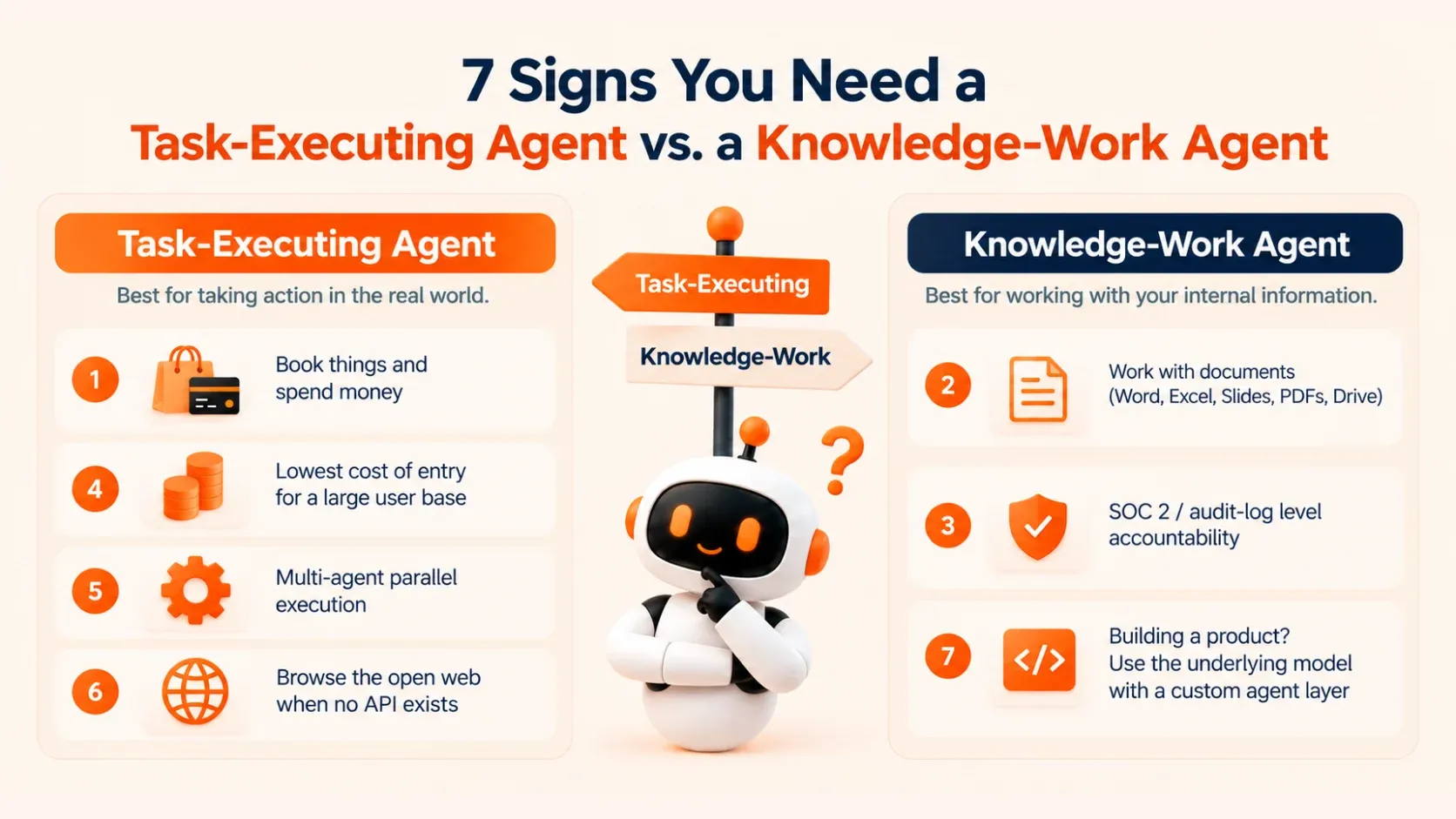
Most teams don't actually need "the best" personal AI agent; they need the right category. Before benchmarking models, check which of these describes your actual use case:
You need someone to book things and spend money on your behalf. That's Muse's and ChatGPT Agent's territory. Cowork isn't built for checkout flows.
Your data lives in Word, Excel, Slides, PDFs, and Drive, not consumer apps. That's Cowork's home turf.
You need SOC 2 / audit-log-level accountability for every agent action. Only Cowork and ChatGPT Enterprise currently productize this; Muse doesn't yet.
You're optimizing for the lowest possible cost of entry across a large user base. Muse's free tier wins on that axis specifically.
You need multi-agent parallel execution on genuinely hard, multi-step problems. That's the kind of multi-agent orchestration work ChatGPT's Ultra mode is purpose-built for, at a real token-cost premium.
You need the agent to browse the open web when no API or connector exists. All three do this now: Muse's embedded browser, ChatGPT's browsing tool, Cowork's built-in browsing.
You're evaluating this as infrastructure for a product you're shipping, not a tool you're using. In that case, none of the three consumer products is the real answer; you want the underlying model plus a custom agent layer, which is a build decision, not a subscription decision.
If more than two of the first six bullet points apply, a consumer subscription is the likely solution for today. If the seventh applies, you have moved beyond comparing tiers of consumption and are now picking a foundation model and execution architecture for something you will own.
Three Architecture Patterns Behind Personal AI Agents
Strip away the branding, and there are really three technical patterns competing here, and they map cleanly onto the products above.
Pattern 1
Broad-permission VM agent. The agent runs persistently in an isolated virtual machine that contains both the agent and the user's connected credentials, pursuing a stated goal with a human approval gate before irreversible actions.
This is the same sort of safety pattern that other agentic AI products have converged on in 2026: a broadly autonomous but low-impact default, which can be escalated by an approval before something irreversible, like a purchase or a message sent to another person.
Meta's Muse Secure VM is the most prominent current example. The tradeoff is that broader standing authorization means a single compromised session has a larger blast radius, even with the approval gate.
Pattern 2
Tiered browsing-and-tools agent. The agent runs in a sandboxed browser plus code interpreter, with access controlled by subscription tier rather than task type.
This is ChatGPT's Agent Mode's solution to the problem. It prioritizes access to compute over access to data, allowing you to spend more money to run more agents in parallel or perform deeper analysis rather than unlock new categories of personal data.
Pattern 3
Scoped, file-grounded orchestration. The agent works on a defined set of files, folders, and connected business tools, with sub-agent orchestration for multi-step work and enterprise-grade access controls (role-based permissions, spending limits, OpenTelemetry traces) as first-class features, and not an afterthought.
That's the shape of Cowork, and it's the pattern most compatible with regulated industries, as every action traces back to a specific tool call against a specific resource.
For an internal build, RejoiceHub would generally recommend Pattern 3 as a starting architecture for anything that touches customer data, not because the model is "smarter," but because the blast radius of a mistake is bounded by design, and a bounded blast radius is what a security review is asking for.
What a RejoiceHub Agent Engagement Actually Includes
If the comparison above tells you a consumer subscription won't cover your use case, here's what a custom build looks like in practice:
- Architecture selection (single-agent vs. multi-agent, VM-isolated vs. scoped-connector) matched to your data sensitivity profile
- Permission model design: what the agent can do autonomously vs. what requires human sign-off, mapped explicitly rather than left to model judgment
- Connector development for your actual internal systems (CRM, ticketing, internal APIs) rather than only consumer-facing integrations
- Audit logging and observability wired in from day one, not retrofitted after a security review flags it
- Model selection and benchmarking against your specific task set, not a generic leaderboard
- A staged rollout: sandboxed pilot with a small user group, then expanded scope once the approval-gate logic has been tested against real edge cases
Engagement and Pricing Models
RejoiceHub structures agent-development engagements three ways, depending on where you are in the build-vs-buy decision:
Discovery sprint
2–3 weeks, fixed fee (typically $15,000–$25,000), produces an architecture recommendation, a permission-model specification, and a cost model comparison between the options of "extending a consumer product" and "building a scoped agent," enabling a commit decision based on hard numbers.
Build engagement
2–3 weeks, fixed fee (typically $15,000–$25,000), produces an architecture recommendation, permission-model specification, and cost model comparison between the options of "extending a consumer product" and "building a scoped agent," enabling a commit decision based on hard numbers.
Ongoing agent operations
Monthly retainer (usually $6000-$18000 per month, but it depends on how many agents you have and how much we need to dig into their workings), which includes updates of the models and connections as the APIs of the tools they use change, and optimization of the use of the models as the amount of work done by your agent increases.
How long does it take? Well, the price depends on how much digging we have to do. Finding out what works for one simple file agent may take a discovery sprint, while designing an integrated system with regulated data may take longer.
RejoiceHub's AI agent development service covers all three stages, and the integration practice handles connector work against legacy or internal-only systems that none of the three consumer products above will ever support out of the box.
Where RejoiceHub Sits in This Landscape
To be clear, RejoiceHub is not a competitor to Muse, ChatGPT Agent, or Claude Cowork. Those are all end-user and prosumer-facing products from foundation-model producers.
RejoiceHub operates at a higher level in the stack, building bespoke agents on whichever foundation model is required and connecting them to the user's own systems as part of a broader digital transformation effort, not a consumer product of any kind.
That's why, by the way, "which agent is best" is the wrong question to ask your engineers.
The right question is "which foundation model and execution pattern should our custom agent be built on?" since none of the products referenced above actually tell you that. They're all context for an architecture decision, not inputs to one.
Teams that fail to make this distinction often find themselves architecture and API compatibility shopping for a consumer product, only to re-platform entirely eighteen months later when the permission model proves insufficient for their use case.
Technical Deep-Dive: The Agent Security Checklist
Whichever pattern you choose, VM-isolated, tiered-browsing, or scoped-connector, run this checklist before granting an agent standing access to anything that matters:
- Map every irreversible action explicitly. Payments, sent messages, deleted files, external API calls with side effects. Each one needs an explicit approval gate, not an assumption the model will ask.
- Scope credentials per-task, not per-agent. An agent that can read your calendar shouldn't automatically be able to send on your behalf unless that's a separate, revocable grant.
- Require session-level audit logs, not just conversation logs. You need to reconstruct which tool call touched which resource, not just what the agent said it did.
- Test the approval gate against adversarial prompts, not just happy paths. A permission model where the agent asks for explicit user approval before sensitive actions only holds if it survives an attempt to talk the agent around it, run that test before launch.
- Set a spending or action ceiling independent of the approval gate. Approval gates fail; hard ceilings are a second line of defense.
- Separate the agent's execution environment from your production credentials store. A compromised agent session shouldn't be a compromised production system.
- Revisit the permission model every time you add a connector. Each new integration expands the blast radius; treat it as a fresh security review, not an incremental add.
This is the same checklist RejoiceHub runs during a discovery sprint, adapted to whichever of the three architecture patterns above fits your task.
Conclusion
Meta Muse, ChatGPT Agent, and Claude Cowork are optimized for different use-cases and audiences. Muse is geared towards consumer breadth and zero-friction adoption, ChatGPT Agent is focused on the depth of the workflows within a subscription tier, and Claude Cowork is about bounded execution against business tools with auditable trails.
Pick the consumer product that best fits the task at hand, not the flashiest one. If your team has moved beyond choosing between the consumer products and is preparing to build agent infrastructure for an owned product, RejoiceHub can help you with an architecture discovery sprint.
We will look at the existing models and custom agents, if any, and analyze if and how they can be extended or replaced by a custom, scoped agent for your product.
Frequently Asked Questions
Which is better, Meta Muse, ChatGPT Agent, or Claude Cowork?
It depends on your use case. Muse suits everyday consumer tasks like bookings and payments. ChatGPT Agent fits deep, multi-step workflows. Claude Cowork is best for file-based, audit-heavy work in regulated industries.
Is Meta Muse free to use?
Yes, Meta Muse has a free tier. Paid options include the Power plan at $20/month and the Maximum tier at $100/month for users who need more access or higher usage limits.
Does ChatGPT Agent Mode cost extra on top of ChatGPT Plus?
Yes. ChatGPT Agent Mode needs a Plus subscription ($20/month) plus a Go subscription. Pro tiers range from $100 to $200/month depending on how much usage and access you need.
What is Claude Cowork used for?
Claude Cowork handles knowledge work like files, folders, and business tools. It connects with Google Drive, Gmail, DocuSign, and Zoom, but it's not built for personal tasks like shopping or bookings.
Which AI agent is safest for business use?
Claude Cowork is considered the safest for business use. It works within a limited, auditable scope with role-based access and spending limits, making it easier to track every action it takes.
Can Meta Muse make purchases on my behalf?
Yes. Meta Muse includes built-in checkout through Link by Stripe, so it can complete purchases directly. It also asks for approval before completing any action that can't be undone.
Does Claude Cowork support online purchases or bookings?
No, Claude Cowork isn't designed for checkout tasks. It focuses on document and code work within connected business tools, not on booking tickets or making payments like Muse or ChatGPT Agent.
What's the difference between a task-executing agent and a knowledge-work agent?
A task-executing agent, like Muse or ChatGPT Agent, books things and spends money for you. A knowledge-work agent, like Cowork, handles files and business tools with detailed audit trails.
Why would a company build a custom AI agent instead of using Muse, ChatGPT, or Claude?
Consumer products don't always fit internal systems or compliance needs. A custom agent lets a company control permissions, connect legacy tools, and set up audit logs suited to its own data rules.
