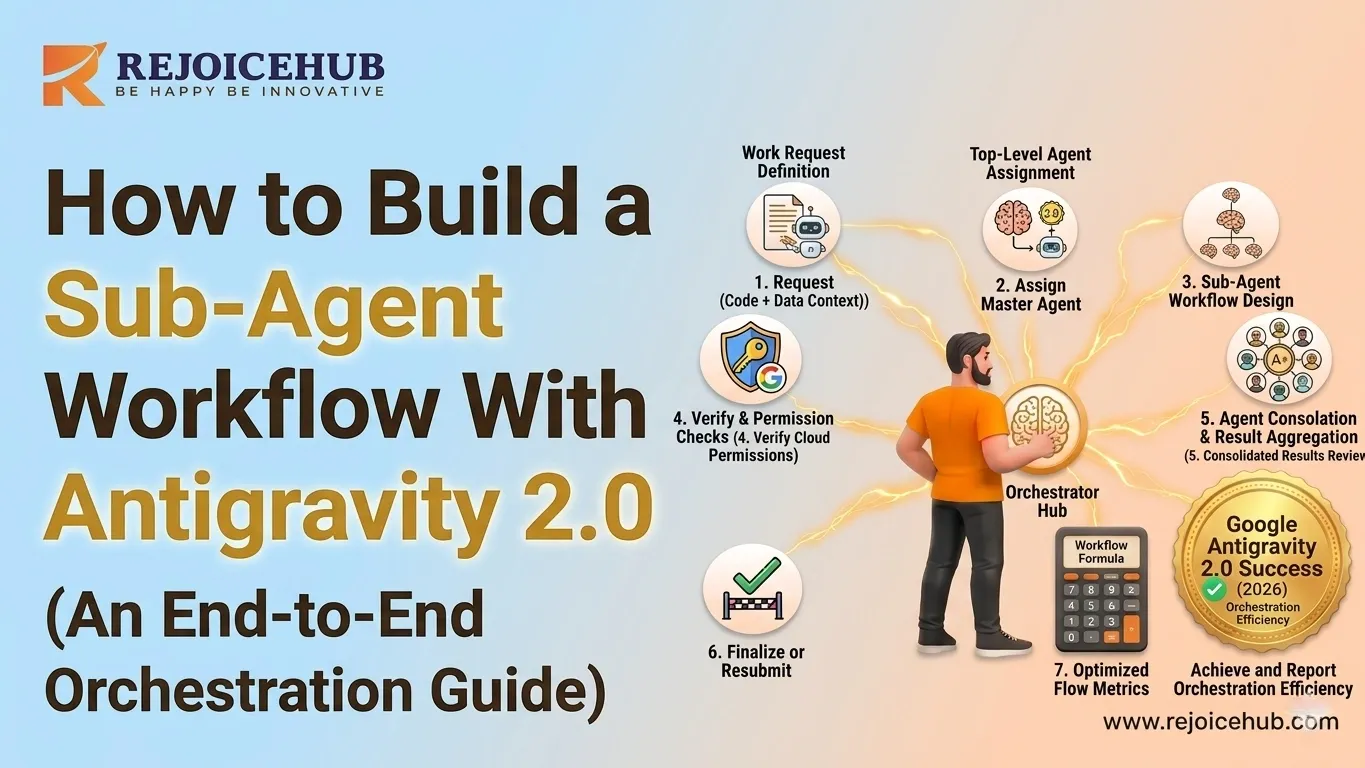
AI agents are no longer some futuristic thing; they're actually running real business stuff right now.
One single agent hits a wall pretty quickly. It can't properly juggle multi-step workflows, you know the kind with a lot of moving parts. Then it starts to run out of context, like everything gets fuzzy. And specialization? Not really. Also, they may fail quietly, so nobody notices until much later.
That's why Google Antigravity 2.0 got built, and also why smart companies are shifting to sub-agent workflows so they can scale their AI operations instead of forcing everything through one mind. If you're still evaluating whether this approach fits your business, understanding what agentic AI workflows actually look like in practice is a solid place to start.
In this guide, you'll see what Google Antigravity 2.0 is, how these sub-agent workflows function in practice, and how you can set one up from scratch step by step.
What Is Google Antigravity 2.0?
Google Antigravity 2.0 is basically Google's enterprise-grade multi-agent AI orchestration framework, or something in that area. It's meant to coordinate multiple specialized AI agents, often called sub-agents, under one central orchestrator that steers the goals, hands out work, and then pulls the outcomes together, kind of in one continuous stroke.
Picture it like a well-run company, right? There's a manager (the orchestrator) who gives out assignments to specialists (sub-agents), keeps an eye on how things are moving. And in the end, the manager delivers the final output not too complicated.
Google introduced Antigravity 2.0 because there's this widening gap in AI infrastructure: most businesses don't really need one single AI doing everything. Instead, they need a crew of AIs, operating together, like a coordinated unit, in sync.
Why It Matters for Enterprise
For SaaS companies, startups, and enterprises, this framework means:
- Parallel processing: multiple agents work simultaneously, not sequentially
- Specialized performance: each agent is optimized for a specific task
- Scalability: add or swap agents without rebuilding the entire pipeline
- Reliability: failures in one agent don't crash the whole workflow
Google Antigravity 2.0 sort of positions AI not just like one single smart instrument, but more as a coordinated team of workers, if you will, with that kind of swarm vibe.
Core Features of Google Antigravity 2.0
| Feature | What It Does |
|---|---|
| Multi-Agent Coordination | Orchestrates multiple AI agents working in parallel or sequence |
| Task Routing | Automatically delegates subtasks to the most capable agent |
| Shared Memory | Maintains a unified context layer all agents can read and write to |
| Autonomous Execution | Agents complete tasks independently without constant human input |
What Is a Sub-Agent Workflow?
A sub-agent workflow is kinda like a hierarchical AI system where a main orchestrator agent breaks up a complex job and sends each part to a specialized sub-agent. Each sub-agent then takes on a pretty clear role, with a limited range, and specific things coming in and things going out. You can say the orchestrator manages the flow, keeps it moving, and coordinates it, without stepping into every little bit.
Single-Agent vs. Multi-Agent: What's the Real Difference?
| Single-Agent System | Multi-Agent System | |
|---|---|---|
| Task handling | Sequential, one task at a time | Parallel, distributed tasks |
| Complexity ceiling | Hits limits fast | Scales with complexity |
| Specialization | Generalist only | Each agent is a specialist |
| Context window | Single, often overloaded | Shared + partitioned memory |
| Failure risk | One point of failure | Isolated, recoverable failures |
For quick Q&A or one-step automation, a single agent usually works just fine. But when you're automating end-to-end workflows like running a sales pipeline, producing multi-section reports, or steering customer onboarding sub-agent workflows are the practical standard for modern AI agents in business.
Typical Sub-Agent Roles
Most production sub-agent workflows include these four core roles:
The Planner Agent sort of breaks the main goal into smaller parts, like sub-tasks. It decides what needs to happen and in what order, plus which agents should handle which bit. It's not always super clean, but it gets the workflow moving.
The Executor Agent actually does the work writing code, calling APIs, generating content, pulling data, or taking actions inside external tools. Basically, it runs the tasks that the plan made, without much fuss.
The Validator Agent checks what comes out before it goes downstream. It catches mistakes and weird stuff like hallucinations, odd formatting, or logic gaps the problems that only show up after the first pass.
The Memory / Context Agent runs the shared state across all agents. It keeps intermediate results, tracks progress through the workflow, and makes sure no one is using stale or incomplete information, even when things get a bit messy.
How to Build a Sub-Agent Workflow With Google Antigravity 2.0
Alright, here's a step-by-step kind of plan, using Google Antigravity 2.0 as your orchestration layer, kind of the main control thingy, I guess.
Note: If you want a custom-built multi-agent system tailored to your business without building from scratch, RejoiceHub specializes in exactly that.
Step 1 — Define the Main Orchestrator
The orchestrator is the brain of your system. It receives the top-level goal and is responsible for:
- Parsing the input into a structured task list
- Determining which sub-agents to activate
- Managing the execution order (sequential vs. parallel)
- Aggregating final outputs
In Google Antigravity 2.0, you define the orchestrator by specifying its goal schema, available sub-agent registry, and routing logic.
orchestrator = AntigravityOrchestrator(
    goal="Generate a full competitive analysis report",
    agents=["planner", "researcher", "writer", "validator"],
    routing_mode="dynamic"  # auto-assigns tasks based on agent capability
)
Keep orchestrator logic lean. Its job is to coordinate not to execute.
Step 2 — Create Specialized Sub-Agents
Each sub-agent should do one thing well. Avoid creating "do-it-all" agents specialization is what makes the system fast and reliable.
For a competitive analysis workflow, you might create:
- ResearchAgent: pulls data from the web, internal docs, and APIs
- AnalysisAgent: processes and interprets the data
- WriterAgent: formats findings into readable sections
- FactCheckAgent: validates claims before the report is finalized
In Antigravity 2.0, each agent is registered with a capability profile so the orchestrator knows when to call it:
research_agent = SubAgent(
    name="ResearchAgent",
    capabilities=["web_search", "document_retrieval"],
    max_tokens=4096,
    output_format="structured_json"
)
The more precisely you define capabilities, the better the orchestrator's routing decisions. This is also closely related to how LLM agents are structured and deployed at scale.
Step 3 — Configure Shared Context and Memory
This is where most DIY implementations break down. Without a proper shared memory layer, agents work in silos duplicating effort, losing context, or building on outdated information.
Google Antigravity 2.0 provides a
SharedContextStorecontext = SharedContextStore( session_id="project_abc_001", schema={ "task_list": [], "completed_tasks": [], "intermediate_results": {}, "final_outputs": {} } )
Set write permissions carefully. The Validator Agent, for instance, should only write to
completed_tasksStep 4 — Set Up Task Routing
Task routing is how the orchestrator decides which agent handles what, and when.
Google Antigravity 2.0 supports three routing modes:
- Static routing: you predefine which agent handles each task type
- Dynamic routing: the orchestrator selects agents based on real-time capability matching
- Conditional routing: logic changes based on previous outputs (e.g., if validation fails, re-route to the executor)
For most enterprise workflows, dynamic + conditional routing gives the best balance of flexibility and reliability:
orchestrator.set_routing_rules([
    {"if": "task_type == 'research'", "assign_to": "ResearchAgent"},
    {"if": "task_type == 'write'", "assign_to": "WriterAgent"},
    {"if": "validation_failed == True", "assign_to": "ExecutorAgent", "retry": True}
])
This makes your pipeline self-correcting a major advantage over rigid linear systems. It's a key reason why AI agent workflows are increasingly replacing traditional automation approaches.
Step 5 — Add Monitoring and Validation
Production AI workflows need observability. Without it, you're flying blind.
Google Antigravity 2.0 includes built-in hooks for:
- Agent-level logging: track what each agent received, processed, and returned
- Latency monitoring: identify bottlenecks in the pipeline
- Hallucination detection: flag outputs that contradict source data or fail schema checks
- Human-in-the-loop triggers: pause the workflow and escalate when confidence is below a threshold
orchestrator.enable_monitoring(
    log_level="verbose",
    alert_on=["hallucination_flag", "validation_failure", "latency > 5s"],
    escalation_contact="[email protected]"
)
Don't skip this step. Monitoring is what separates a demo from a production system.
Real-World Use Cases for Multi-Agent AI Systems
Here's where the Google Antigravity 2.0 workflow kinda goes from theory into ROI in a smooth-ish way:
-
Customer Support Automation: You route inbound questions through a classifier agent, then hand things off to specialized agents (billing, technical, onboarding) and make sure responses are validated before anything gets delivered. Result: faster resolution, fewer escalations, and 24/7 availability. The broader playbook for AI customer support automation covers this in more depth.
-
Autonomous Coding Systems not just "write once" stuff: a planner agent interprets the feature request, an executor writes the code, a testing agent runs checks, and a reviewer agent flags risks; all of it lands before a human even sees the PR.
-
Enterprise Workflow Automation: is more like orchestration than simple automation: automate cross-department tasks such as contract review, invoice processing, or compliance verifications. Each step is handled by a specialized agent, with a full audit trail included so nothing feels mysterious later.
-
Research Agents can be deployed to gather info from multiple sources, cross-reference the findings, surface contradictions, and then synthesize a report. Usually, it takes minutes, not days, so teams get leverage quickly.
-
Sales Automation handles the grind end to end: qualify leads, tailor outreach, refresh CRM entries, and book follow-ups autonomously, at scale, without the usual "who's doing what" confusion.
Building one of these for your business? RejoiceHub designs and deploys custom multi-agent AI systems for enterprise and growth-stage companies. Let's talk.
Common Challenges and Best Practices
1. Challenges to Expect
Orchestration complexity: kind of ramps up, because as more agents come in, it gets harder to juggle dependencies and decide the order. Like, always document your agent graph before you write a single line of code. Not later, not "after I'm done" earlier.
Hallucination chains: are real; one agent gets something wrong, and that weirdness can leak into downstream outputs. Which is why a Validator Agent isn't optional; it's basically essential no shortcuts.
Memory drift: happens when you don't manage state carefully, and then the agents start working from stale context, which feels like they're in the wrong room. Timestamp every write to your
SharedContextStoreLatency: parallel execution can help a lot, but the API call overhead adds up more than you'd expect. So profile your pipeline early, then figure out which agents can run concurrently versus those that need to be sequential.
2. Best Practices
- Modular architecture: design agents so they can be swapped, upgraded, or disabled independently
- Human oversight: add review checkpoints for high-stakes actions (sending emails, making purchases, deploying code)
- Observability tools: integrate with LangSmith, Langfuse, or Google's native monitoring dashboard
- Cost monitoring: track token usage per agent per workflow costs can spike fast in complex pipelines. Reviewing how to build an agentic AI system for your business can help you right-size the architecture from the start.
Why Google Antigravity 2.0 Matters for Enterprise AI
We're in the middle of a major shift here AI is moving away from assistive tools, you know, those things that help humans do tasks, and more toward autonomous systems, the sort that complete whole workflows by themselves, sort of independently. It's not just a tweak; it feels like a full change, and honestly, the direction is clear even if the details still wobble a bit.
For enterprise teams, this means:
- Competitive advantage: companies that deploy multi-agent systems will outpace those still running single-agent automations
- Operational scalability: AI-native operations that grow with demand, not headcount
- Cost efficiency: replace repetitive multi-person workflows with reliable, auditable AI pipelines
- Speed to market: compress weeks of research, writing, and review cycles into hours
The businesses investing in AI agent infrastructure today are building a moat that will be very hard to close in 18–24 months.
Conclusion
Google Antigravity 2.0 is more than just a framework; it's kinda a blueprint for how modern companies will operate AI-driven stuff at scale.
With a clever orchestrator, plus specialized sub-agents, shared memory, smart routing, and observability that's already baked in, you can put together workflows that end up faster, more dependable, and more scalable than what any lone AI agent can usually manage.
The move toward multi-agent AI isn't coming; it's already here. The real question is whether your business is actually designing for it or still thinking like it's single-agent day.
Frequently Asked Questions
1. What is Google Antigravity 2.0, and what does it do?
Google Antigravity 2.0 is Google's multi-agent AI framework built for enterprise use. It lets you run multiple specialized AI agents under one central orchestrator. Think of it like a manager handing tasks to a team. Each agent handles one job, and the orchestrator ties everything together.
2. How is Google Antigravity 2.0 different from using a single AI agent?
A single agent handles one task at a time and runs out of context fast. Google Antigravity 2.0 lets multiple agents work at the same time, each focused on what they do best. That means fewer errors, better output quality, and a workflow that actually scales without breaking down.
3. How do I start building a sub-agent workflow with Google Antigravity 2.0?
Start by defining your orchestrator it's the brain that assigns work. Then create specialized sub-agents for tasks like research, writing, or validation. Set up a shared memory layer, configure your task routing rules, and add monitoring. The Google Antigravity 2.0 tutorial above walks through each step clearly.
4. What are sub-agents and why do you need them in an AI workflow?
Sub-agents are smaller, focused AI agents that each handle one specific part of a bigger task. Instead of one AI doing everything, each sub-agent specializes one researches, one writes, one checks facts. This setup makes your Antigravity 2.0 workflow faster, cleaner, and much easier to manage at scale.
5. Can small businesses or startups use Google Antigravity 2.0?
Yes, absolutely. While it's built with enterprise needs in mind, the Google AI agent framework works well for growth-stage startups too. If your business runs multi-step workflows like lead generation, content production, or customer support, building AI agents with Google Antigravity 2.0 can save serious time and cost.
6. What common mistakes should I avoid when building AI agents with Google Antigravity?
The biggest mistakes are skipping the shared memory setup, not adding a Validator Agent, and ignoring monitoring. Without these, agents work in silos, errors spread downstream, and you won't catch problems until it's too late. Always map your agent structure before writing any code and track token usage from day one.
7. How does task routing work in a Google Antigravity 2.0 workflow?
Task routing decides which agent handles which job. Google Antigravity 2.0 supports three modes static, dynamic, and conditional. Dynamic routing lets the orchestrator pick the right agent automatically based on the task type. Conditional routing goes a step further and re-routes tasks if something fails, making your whole pipeline self-correcting.